SLA 3D Printing Guide
Everything you need to know about Stereolithography - resin types from Standard to High-Temp, design rules, tolerance data, and when SLA is the right choice for your parts.
Why SLA Matters
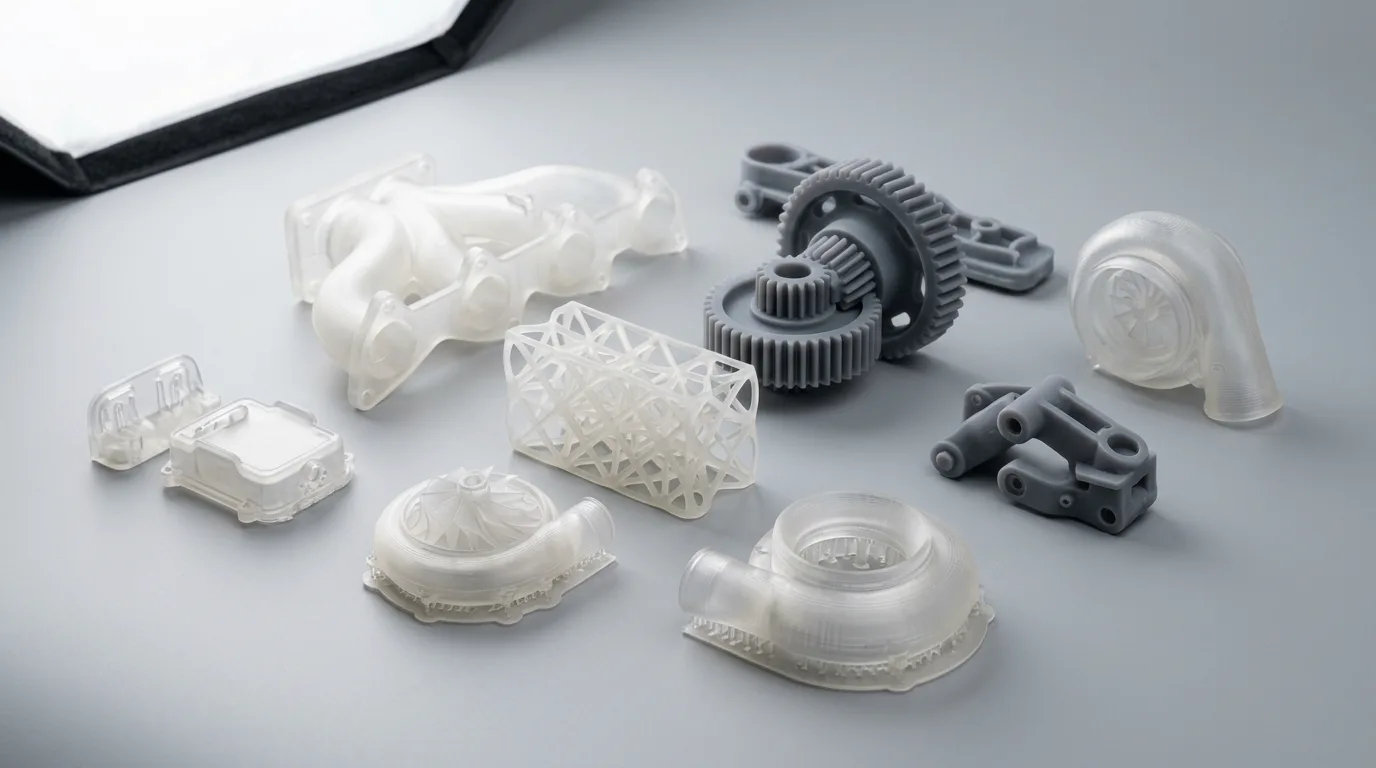
SLA is the gold standard for surface finish in additive manufacturing. When your prototype will be shown to a client, presented to investors, or used as a master pattern for silicone molding, SLA is the process that makes 3D-printed parts look like they came out of an injection mold. This guide gives you the engineering data to use SLA effectively - and know when to reach for a different process instead.
How SLA Works - The Deep Dive
SLA uses a UV laser to cure liquid resin one layer at a time - delivering smooth surface finish and fine feature resolution for polymer AM parts.
Stereolithography (SLA) was the first commercialized 3D printing technology (Chuck Hull, 1986). A UV laser (405 nm wavelength) traces each layer's cross-section on a vat of liquid photopolymer resin, selectively curing it into solid material. Modern desktop SLA uses an inverted (bottom-up) architecture: the build platform hangs above the resin tank, and each layer cures against a transparent film at the bottom of the vat. After curing, the platform lifts to peel the part from the film, fresh resin flows in, and the next layer is exposed. This peel-and-cure cycle produces parts with near-invisible layer lines (25–50 µm resolution) and the smoothest surfaces achievable in polymer 3D printing.
Laser spot size (85–140 µm)
Determines XY resolution and minimum feature size. Smaller spot = finer detail but slower print speed. Formlabs Form 3: 85 µm laser spot (note: Form 4 uses MSLA/LCD technology, not laser SLA). Industrial SLA (3D Systems): as low as 75 µm.
Layer height (0.025–0.1 mm)
Controls Z-axis resolution and surface smoothness. 0.025 mm for maximum detail (jewelry, dental). 0.05 mm for general prototyping. 0.1 mm for faster, less critical builds.
Peel mechanism (LFS vs. standard)
Low Force Stereolithography (Formlabs) uses a flexible film that peels gradually, reducing suction forces and enabling larger parts with fewer supports. Standard SLA uses a rigid window - higher peel forces, more supports needed.
UV post-curing
SLA parts are not fully cured off the printer. A secondary UV cure (405 nm, 15–60 min at 140–176 °F / 60–80 °C) is required to reach final mechanical properties. Skip this and your parts will be 30–50% weaker and may warp over time.
Support structures
Required for overhangs, bridges, and unsupported islands. Supports are thin, breakaway structures that leave small witness marks (0.3–0.5 mm dimples). Place supports on non-cosmetic surfaces whenever possible.
Resin handling & safety
Uncured resin is a skin sensitizer - always wear nitrile gloves. IPA or TPM wash is required to remove residual resin. Proper ventilation recommended. Waste resin must be fully UV-cured before disposal.
Pro Tip
SLA's killer advantage is surface finish: 25–100 Ra µin (0.6–2.5 µm) as-built. No other polymer AM process comes close. If your part will be shown to stakeholders, investors, or customers, SLA is the default choice.
Resin Types Guide
SLA resins span from commodity standard formulations to biocompatible dental grades and 552 °F (289 °C) high-temp ceramics.
Unlike FDM where you choose from discrete filaments, SLA resins are photopolymer chemistries engineered for specific properties. Each resin has unique post-cure requirements, shrinkage behavior, and long-term stability characteristics.
| Resin Type | Tensile (MPa) | HDT (°C) | Key Properties | Best For | $/L |
|---|---|---|---|---|---|
| Standard | 38–65 | 42–58 | High detail, brittle, smooth finish | Visual prototypes, presentation models | $35–60 |
| Tough / ABS-Like | 55 | 73 | Impact resistant, moderate flexibility | Snap-fits, functional prototypes, housings | $60–90 |
| Durable | 35 | 48 | High elongation (50%), low friction | Wear parts, low-friction assemblies, hinges | $80–120 |
| Flexible / Elastic | 3–8 | - | Shore 50A–80A, 200–400% elongation | Gaskets, seals, soft-touch prototypes | $80–120 |
| High Temp | 58 | 238–289 | Maintains rigidity at extreme heat | Tooling, mold masters, under-hood testing | $120–180 |
| Castable | - | - | Clean burnout at 1,292 °F (700 °C), <0.02% ash | Investment casting patterns, jewelry masters | $100–200 |
| Dental / BioMed | 50–65 | - | Biocompatible (Class IIa), autoclavable | Surgical guides, dental models, aligners | $150–300 |
| Ceramic-Filled | 70 | 85 | High stiffness, stone-like finish | Functional parts requiring rigidity | $100–160 |
Pro Tip
For 80% of SLA work, you only need two resins: Standard for visual prototypes and Tough for functional parts. Only move to specialty resins when a specific property (flexibility, heat resistance, biocompatibility) is required.
Design Guidelines (DFM)
SLA design rules are governed by laser resolution, support placement, and resin drainage. Follow these to minimize support marks and maximize part quality.
SLA can resolve finer features than any other polymer AM process - but it also has unique constraints around drainage, support placement, and UV curing behavior. These rules assume a desktop SLA printer (Formlabs class) with 0.05 mm layer height.
| Feature | Recommended | Minimum | Notes |
|---|---|---|---|
| Wall thickness | 0.6 mm | 0.4 mm | Below 0.4 mm, walls may crack during support removal |
| Unsupported overhang | <30° from vertical | <45° | Steeper than 45° causes sagging and rough underside |
| Drainage holes | ≥3.5 mm dia. (×2 per cavity) | 2.0 mm | Required for all hollow features - trapped resin = failed parts |
| Min feature size | 0.3 mm | 0.2 mm | Depends on laser spot; sub-0.2 mm features unreliable |
| Embossed/engraved text | 0.4 mm wide, 0.4 mm tall/deep | 0.3 mm | Serif fonts may lose detail at small sizes |
| Hole diameter | ≥1.0 mm | ≥0.5 mm | Small holes may clog with uncured resin |
| Aspect ratio (thin features) | 1:10 (width:height) | 1:15 | Tall thin features warp during UV post-cure |
| Part-to-part clearance | 0.2 mm/side | 0.15 mm | For assemblies and moving joints |
| Support contact diameter | 0.4 mm | 0.3 mm | Smaller = less scar, but weaker hold during build |
| Orientation | 10–20° off-horizontal for flat areas | 5° | Reduces peel force and prevents suction-cup effect |
Pro Tip
The #1 SLA design mistake: forgetting drainage holes on hollow parts. Uncured resin trapped inside your part will eventually leak out through micro-cracks, ruining the surface and part geometry. Always add at least two drain holes per cavity (one for drainage, one for air flow).
Tolerances & Accuracy
SLA delivers high dimensional accuracy for polymer AM - ±0.005″ standard, ±0.002″ achievable on small features.
SLA accuracy is determined by laser spot precision (XY), layer height (Z), and resin shrinkage during curing. Small parts (<50 mm) achieve the tightest tolerances; accuracy degrades on larger parts due to cumulative thermal and cure-induced shrinkage.
| Machine Class | Std Tolerance | Best Achievable | Surface Finish (Ra) | Max Build Volume |
|---|---|---|---|---|
| Desktop (Formlabs Form 4) | ±0.005″ (±0.13 mm) | ±0.002″ (±0.05 mm) | 25–100 µin (0.6–2.5 µm) | 200 × 125 × 210 mm |
| Prosumer (Prusa SL1S) | ±0.005″ (±0.13 mm) | ±0.003″ (±0.08 mm) | 30–100 µin (0.8–2.5 µm) | 127 × 80 × 150 mm |
| Industrial (3D Systems) | ±0.003″ (±0.08 mm) | ±0.001″ (±0.025 mm) | 16–63 µin (0.4–1.6 µm) | 750 × 750 × 550 mm |
Shrinkage compensation
SLA resins shrink 0.2–0.5% during UV curing. On a 100 mm part, 0.5% = 0.5 mm - significant for mating features. Most slicers include shrinkage compensation settings; calibrate with a test print.
XY vs. Z accuracy
XY accuracy is set by laser precision (excellent). Z accuracy is limited by layer height (0.025–0.1 mm). For features requiring tight Z-tolerances, use the minimum layer height setting.
Post-cure dimensional change
Parts can shrink an additional 0.1–0.3% during UV post-cure. For critical assemblies, measure dimensions after post-cure, not immediately off the printer. Some resins (Rigid 10K) have minimal post-cure shrinkage.
Pro Tip
SLA is the most accurate polymer AM process - but accuracy degrades with part size. For parts <50 mm, expect ±0.002″ achievable. For parts >200 mm, plan for ±0.005–0.008″ due to cumulative shrinkage. If you need tight tolerances on a large SLA part, post-machine the critical interfaces.
Cost Analysis
SLA costs 2–3× more than desktop FDM per part, but delivers 5–10× better surface finish and 2× better accuracy. The trade-off is worth it when quality matters.
SLA cost is driven by resin consumption (the dominant factor), machine time, and post-processing labor (wash, cure, support removal). Unlike FDM, SLA post-processing is non-negotiable - every part must be washed and UV-cured.
| Cost Component | Desktop SLA | Industrial SLA | Notes |
|---|---|---|---|
| Machine rate | $5–15/hr | $25–80/hr | Desktop: $3K–$10K ÷ 3,000 hr lifespan |
| Resin (model) | $35–200/L ($80–200/kg equiv.) | $80–300/L | Specialty resins (High-Temp, BioMed) cost 3–5× standard |
| Resin (support) | Same resin used for supports | - | Supports consume 5–15% additional resin |
| IPA/TPM wash solvent | $0.50–2.00/part | $1–5/part | Solvent must be replaced regularly (~1L/50 parts) |
| UV post-cure | $0.10–0.50/part | $0.50–2/part | Electricity + lamp depreciation; 15–60 min per batch |
| Labor (post-process) | $5–15/part | $10–30/part | Wash, cure, support removal, sanding if needed |
Per-part example: 50 × 50 × 25 mm bracket in Tough Resin
Desktop SLA: ~$15–35 (1–3 hr print, ~20 mL resin, wash + cure + support removal). Industrial: ~$40–80. Compare to FDM at $3–8 - SLA costs 3–5× more but delivers professional-grade surface finish.
When SLA is worth the premium
Stakeholder/investor presentations, investment casting patterns, dental/medical applications, parts with features <1 mm, and any prototype where surface finish drives the design review outcome.
When to switch away from SLA
Need isotropic mechanical strength → SLS/MJF. Need large parts (>300 mm) → FDM. Need 50+ identical parts → SLS/MJF (packing efficiency). Need outdoor UV stability → FDM (ASA) or SLS.
Pro Tip
SLA resin cost per part drops significantly with efficient build-plate packing. A full build plate of small parts (dental models, jewelry masters) can bring per-part cost down to $3–5 - but a single large part filling the plate may cost $50–100 in resin alone.
Applications & Use Cases
SLA dominates where surface finish, fine detail, and dimensional accuracy matter most.
Visual & cosmetic prototypes
The default choice when parts will be shown to stakeholders, investors, or customers. SLA surface finish (25–100 Ra µin) approaches injection-mold quality. Sanding and painting produce production-representative cosmetic models.
Investment casting patterns
Castable resin burns out cleanly at 1,292 °F (700 °C) with <0.02% ash residue. Used for jewelry masters, precision investment casting patterns, and dental frameworks. Replaces expensive wax tooling for low-volume casting.
Dental & medical devices
Biocompatible resins (Class IIa, ISO 10993) enable direct production of surgical guides, dental models, aligners, and hearing aid shells. SLA dominates the dental industry - most dental labs use SLA printers.
High-detail prototypes (<1 mm features)
Microfluidic channels, small text, thin ribs, and other fine features that FDM and SLS cannot resolve. SLA can reliably print features down to 0.2 mm - 4× finer than FDM.
Tooling masters & mold patterns
High-Temp resin (552 °F / 289 °C HDT) can serve as injection mold inserts for short runs (<100 shots). Standard resin patterns are used to create silicone molds for urethane casting of 10–50 prototype units.
Miniatures & consumer products
Tabletop gaming miniatures, architectural models, figurines, and custom consumer products. The fine detail and smooth surface of SLA make it the industry standard for miniature printing.
Pro Tip
SLA + silicone molding + urethane casting offers a rapid path to 10–50 production-representative prototype units. Print the master in SLA, create a silicone mold, cast in the target material. Total turnaround: 3–5 days.
Strengths & Trade-offs
SLA offers smooth surface finish in polymer AM - but that comes with trade-offs in mechanical properties and long-term stability.
SLA excels in a narrow but important niche: high-detail, smooth-surface parts where appearance or fine features are critical. Here's the honest trade-off matrix:
| Factor | SLA Strength | SLA Trade-off |
|---|---|---|
| Surface finish | Best in polymer AM: 25–100 Ra µin as-built | Layer lines visible at 0.1 mm; use 0.05 mm or finer for cosmetic parts |
| Detail resolution | Features down to 0.2 mm reliable | Fine features are fragile - handle with care during support removal |
| Accuracy | ±0.002″ achievable on small parts | Degrades to ±0.005–0.008″ on parts >200 mm due to shrinkage |
| Materials | 8+ resin families: Tough, Flexible, High-Temp, Dental | Most resins are brittle; UV degradation over weeks/months outdoors |
| Post-processing | Smooth as-built; minimal sanding needed | Mandatory wash + UV cure adds 30–60 min per batch (non-negotiable) |
| Mechanical | Standard resin: 65 MPa tensile | Brittle (2–5% elongation); poor fatigue life; degrades under sustained UV |
| Cost | 2–3× desktop FDM but quality justifies for visual parts | Specialty resins (High-Temp, BioMed) cost $120–300/L |
| Build volume | Desktop: up to 145 × 145 × 185 mm (Form 3+); large-format: 335 × 200 × 300 mm (Form 3L) | Smaller than FDM and SLS; large parts need industrial machines ($80K+) |
Pro Tip
SLA is the clear winner for any part that will be seen - prototypes for design reviews, investor demos, or trade shows. But if the part will be loaded, stressed, or live outdoors, SLS or FDM with engineering materials is almost always the better choice.
Common Mistakes
These SLA-specific mistakes waste resin, ruin surface finish, or produce parts that fail in the field.
Skipping UV post-cure
Parts straight off the printer are "green" - only 60–70% of final cure. Without proper UV post-cure (15–60 min at 140–176 °F / 60–80 °C), parts are 30–50% weaker, dimensionally unstable, and may warp over days. This is not optional.
Forgetting drainage holes on hollow parts
Trapped uncured resin inside hollow features will eventually leak out through micro-cracks, destroying the part. Add at least two drainage holes (≥3.5 mm dia.) per cavity - one for drainage, one for air flow.
Placing supports on cosmetic surfaces
Support contact points leave 0.3–0.5 mm dimples that require sanding to remove. Orient your part so supports attach to hidden or non-critical surfaces. This 5-minute orientation decision saves hours of post-processing.
Using SLA parts outdoors without UV protection
Most SLA resins yellow and become brittle within weeks of direct sunlight exposure. If parts must live outdoors, apply UV-resistant clear coat, or switch to FDM with ASA filament which is inherently UV-stable.
Expecting SLA parts to handle sustained loads
SLA resins creep under constant load - a shelf bracket that holds fine for a day may sag over a week. For load-bearing applications, use SLS (Nylon PA12) or FDM (Nylon, PC, PEEK) instead.
Under-washing or over-washing parts
Under-washing (< 5 min in IPA) leaves sticky residue. Over-washing (>20 min) can cause the surface to swell and become chalky white. Follow manufacturer wash-time guidelines precisely, and use a two-stage wash for consistent results.
Pro Tip
Create an SLA post-processing station: (1) wash tank with IPA, (2) rinse station, (3) UV cure chamber, (4) support removal tools, (5) sanding supplies. A proper station reduces post-processing time by 50% and improves part quality consistency.
Frequently Asked Questions
Need High-Detail SLA Parts?
Upload your CAD file to compare whether SLA is the right path for your detail, finish, and fit requirements. Most quotes are returned within one business day. Quotes typically include engineer-reviewed manufacturability feedback.
Get SLA Quote