PolyJet 3D Printing:
Materials, Design Rules & Cost
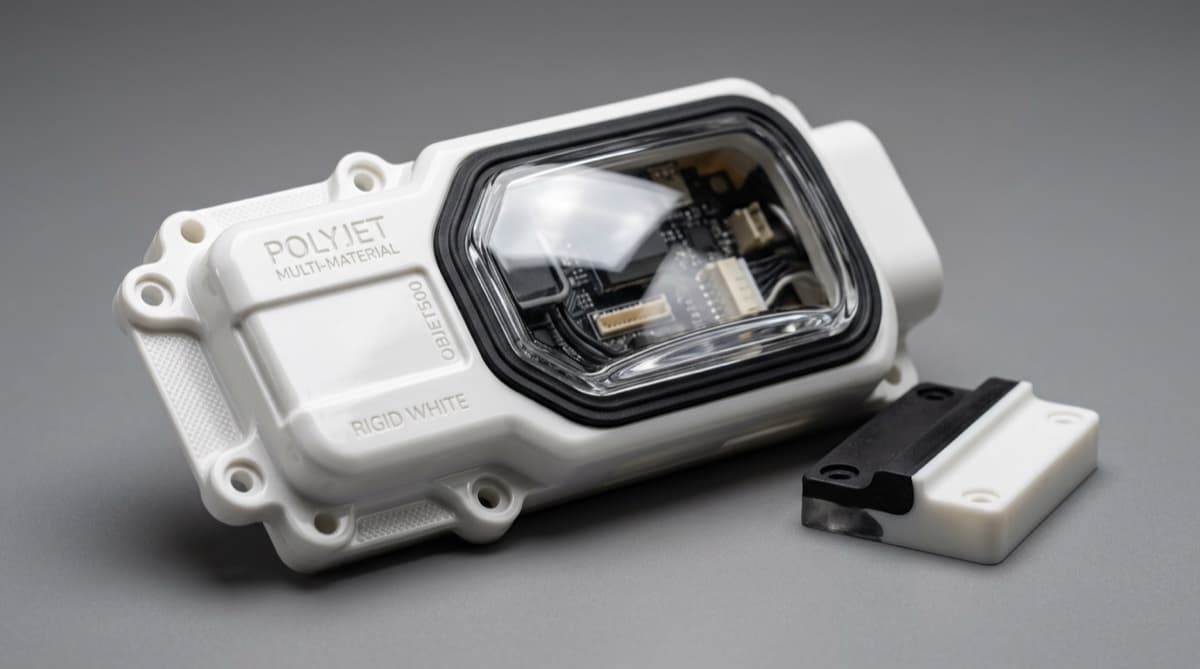
PolyJet deposits and UV-cures photopolymer droplets in 16 µm (0.016 mm / 0.0006 in.) layers, producing smooth surface finish and multi-material polymer parts that combine rigid, flexible, and transparent regions in a single build without assembly.
How PolyJet Works
When you need multi-material prototypes with the finest surface finish in polymer AM, PolyJet is the process to specify. PolyJet deposits photopolymer resin — liquid plastic that solidifies when exposed to ultraviolet light — through piezoelectric inkjet nozzles and cures each layer instantly with UV lamps. The mechanism is the same as an office inkjet printer, but with photopolymers instead of ink and layer thicknesses measured in microns instead of millimeters.
The Print Cycle (per layer)
- 1
Print head traverses the X-axis, jetting model and support material simultaneously through separate nozzle arrays.
- 2
UV lamps flanking the print head cure each deposited droplet immediately — no liquid bath, no post-cure oven required.
- 3
A roller levels the freshly deposited layer to a precise thickness (16 µm or 32 µm depending on quality mode).
- 4
The build tray indexes down by one layer thickness (Z-axis), and the cycle repeats.
Support Material: SUP706 / SUP707
PolyJet uses water-soluble gel support materials (SUP706 for most applications; SUP707 for complex internal geometries and bio-compatible builds) that fill overhangs, undercuts, and hollow interiors. After printing, a water jet station dissolves the support without mechanical force — preserving delicate features that would snap under manual support removal. This makes PolyJet well-suited for fine internal channels, thin snap-fit arms, and complex multi-material interfaces where support removal access is limited.
PolyJet Material Families
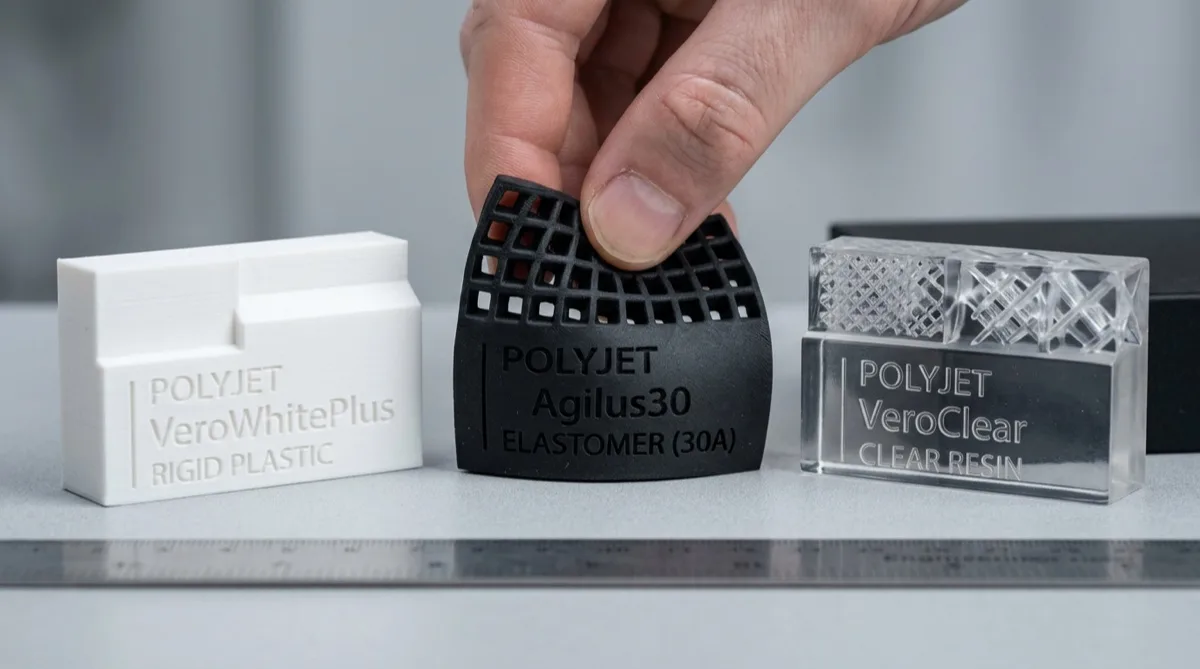
Your material selection determines whether a PolyJet part ends up rigid, flexible, transparent, heat-resistant, or biocompatible — and you can combine all six families in a single build. Stratasys PolyJet offers four primary material families (rigid opaque, flexible, transparent, and bio-compatible), with high-temperature and digital-ABS variants expanding the range to six application categories. All are photopolymers — they cure by UV crosslinking (a chemical reaction where UV light bonds polymer chains into a solid network) rather than by heat or sintering.
Reading the table below: UTS (ultimate tensile strength) is the maximum pull force a material withstands before breaking. Shore D measures hardness of rigid plastics (higher = harder); Shore A measures flexible materials (lower = softer). HDT (heat deflection temperature) is the point where a part starts to soften under load. Elongation at break is how far the material stretches before snapping.
| Material Family | Grade | UTS (MPa / psi) | Hardness | HDT (°C / °F) | Elongation at Break | Primary Use |
|---|---|---|---|---|---|---|
| Rigid Opaque | VeroWhite Plus / VeroBlack Plus | 50–65 MPa (7,250–9,425 psi / 500–650 bar) | Shore D 83 | 45–50°C (113–122°F) | 10–25% | Housings, fixtures, visual prototypes |
| Transparent | VeroClear / VeroUltraClear | 50–65 MPa (7,250–9,425 psi / 500–650 bar) | Shore D 80 | 45–50°C (113–122°F) | 10–25% | Lenses, fluid flow channels, windows |
| Flexible | Agilus30 (Shore A 30 to 95 range) | 2.4–3.5 MPa (350–510 psi / 24–35 bar) | Shore A 30–95 (blend-tunable) | 35–40°C (95–104°F) | 220–270% | Gaskets, grips, living hinges, overmold simulation |
| High-Temp | RGD525 | 70–80 MPa (10,150–11,600 psi / 700–800 bar) | Shore D 82 | 63–67°C (145–153°F) | 15–25% | Thermal test fixtures, under-lamp jigs |
| Bio-Compatible | MED610 / MED620 | 50–65 MPa (7,250–9,425 psi / 500–650 bar) | Shore D 83 | 45–50°C (113–122°F) | 15–25% | Surgical guides, anatomical models (ISO 10993-5 / USP Class VI) |
| Digital ABS Plus | Digital ABS Plus (Ivory/Black) | 55–60 MPa (7,975–8,700 psi / 550–600 bar) | Shore D 86 | 58–68°C (136–154°F) | 25–40% | Snap-fits, electronic housings, ABS simulation |
Digital Materials (Shore A blending): PolyJet can mix Agilus30 and VeroWhite in precise ratios to print intermediate Shore A values — from Shore A 27 (near-silicone) through Shore A 95 (near-rigid). This is useful for simulating over-molded parts where the substrate and overmold are printed simultaneously with a defined durometer gradient at the interface. Each blend is specified in the slicer as a named Digital Material composition.
PolyJet Design Guidelines
Your CAD file needs specific adjustments for PolyJet — wall thickness, feature size, and multi-material interface design all directly affect whether your part prints successfully or fails during support removal. PolyJet's gel support (SUP706) removes cleanly from complex geometry, but violating the constraints below leads to delamination, distortion, or retained support material.
- Rigid (Vero): 1.0 mm (0.040 in.) structural, 0.6 mm cosmetic
- Flexible (Agilus30): 0.8–1.5 mm minimum
- Thin shells: 1.5 mm minimum for hollow parts (survives water-jet pressure)
- Thin ribs connecting to walls: match wall thickness ± 0.3 mm
- Z-axis surfaces (top face): Ra 1–3 µm — orient critical cosmetic surfaces to face up
- Support-contact surfaces (downward-facing): Ra 3–6 µm after support removal
- Rotate parts ±10° to eliminate flat horizontal areas that trap support material
- Complex undercuts do not require special orientation — gel support handles them
- VeroClear: avoid walls >10 mm for clearer optics; internal scattering increases with thickness
- Add 0.5–1.0 mm oversize to polished surfaces to allow post-sand
- For light-pipe function: orient the optical axis along X or Y, not Z
- Yellow tint in VeroClear increases with UV exposure — store away from direct sunlight
- Minimum hinge thickness: 0.5 mm (0.020 in.) for reliable flex
- Hinge length: ≥3× the hinge width for uniform flex angle
- Blend 15–25% VeroWhite into Agilus30 hinge zone for rebound vs. pure elastomer
- Test hinge flex angle in CAD — >90° deflection on thin hinges causes tearing
- Define material boundaries with 0.3–0.5 mm overlap for bonding (avoid sharp zero-thickness interfaces)
- Flexible-to-rigid interfaces fail at the bond if part experiences cyclic load > Shore A 50 on flexible side
- Dovetail or mechanical interlock geometry at critical bond lines improves peel strength 2–3×
- Color accuracy: RGB values drift slightly between print jobs — not suitable for color-matched production
- Internal channels: minimum 0.5 mm diameter for gel support removal via water jet
- Blind holes deeper than 30 mm may retain support — add draft or vent holes
- Thin pins (<0.8 mm dia.) printed vertically tend to bow — orient horizontally
- Threaded holes: print at M3 or larger; tap smaller sizes after print
PolyJet Tolerances and Accuracy
If your part requires ±0.10 mm (±0.004 in.) dimensional accuracy with a mirror-smooth surface, PolyJet achieves it — but the distinguishing advantage over SLA is layer resolution and multi-material, not tighter tolerances. A tolerance defines the acceptable variation band around a nominal dimension. PolyJet holds tighter tolerances than SLS and FDM but is comparable to SLA.
PolyJet Dimensional Tolerance Table
| Part Dimension | Tolerance |
|---|---|
| ≤100 mm (≤3.94 in.) | ±0.10 mm (±0.004 in.) |
| 100–300 mm | ±0.20% of nominal dimension |
| >300 mm | ±0.30% of nominal dimension |
| Feature-to-feature (same material) | ±0.10 mm |
| Across material boundary (multi-material) | ±0.15 mm |
Surface Finish by Face Orientation
PolyJet Cost Analysis
Your PolyJet quote will typically be 2–5× higher than an equivalent SLA or SLS part — the cost is justified when multi-material capability eliminates assembly steps or when surface finish is the primary requirement. Photopolymer resin costs $91–182/lb ($200–400/kg) versus $14–27/lb ($30–60/kg) for SLS nylon powder.
What Drives PolyJet Cost
- Build volume: Material cost scales linearly with part volume — 50 cm³ part uses ~$15–25 of resin at material cost alone
- Support material fraction: Heavily undercut parts require 30–60% support material by volume, which doubles effective material cost
- Number of materials: Each additional material family adds ~$5–15 to setup cost for cartridge verification
- Quality mode: High-quality (16 µm) mode runs ~40% slower than high-speed (32 µm) — adds 30–50% to print time cost
- Post-processing: Water-jet support removal: $10–20 for simple parts; longer for deep channels or fine mesh geometry
Typical Cost Ranges
| Part Size / Type | Typical Range |
|---|---|
| Small single-material (50×50×20 mm) | $50–100 |
| Medium single-material (150×100×50 mm) | $100–200 |
| Multi-material (2 materials, small) | $100–200 |
| Multi-material (3+ materials, med.) | $200–500 |
| Transparent/clear optical part | $80–250 |
| Bio-compatible medical model | $150–400 |
When PolyJet Cost is Justified
- Multi-material assembly saved: eliminates $50–200 of manual assembly labor per prototype
- No-touch support removal on thin features that would break under manual extraction
- Medical anatomical model requiring both rigid bone and flexible soft-tissue zones
- Consumer product appearance prototype needing exact color, gloss, and soft-touch zones
- Overmold simulation: prototype a 2-shot injection-molded part without molding tooling
When to Choose SLA or MJF Instead
- Single-material visual prototype — SLA at 40–70% lower cost
- Functional mechanical testing — SLS/MJF PA12 is stronger and near-isotropic
- High volumes (>25 pcs) — PolyJet does not scale economically
- Temperature above 158°F (70°C): Vero HDT is too low; use SLS or FDM PEEK
PolyJet vs SLA vs FDM
When choosing between PolyJet, SLA (stereolithography), and FDM (fused deposition modeling) for your prototype, the decision comes down to three factors: multi-material need, cost target, and build volume. These are the three most common polymer AM processes for prototyping — the table below provides a direct specification comparison so you can make the right call for your application.
| Attribute | PolyJet | SLA | FDM |
|---|---|---|---|
| Layer thickness | 16–32 µm (0.016–0.032 mm / 0.0006–0.0013 in.) | 25–100 µm (0.025–0.10 mm / 0.001–0.004 in.) | 100–300 µm (0.10–0.30 mm / 0.004–0.012 in.) |
| Tolerance (typical) | ±0.10 mm (±0.004 in.) | ±0.13 mm (±0.005 in.) | ±0.50 mm (±0.020 in.) |
| Surface finish (Ra) | 1–3 µm (40–120 µin.) | 1–3 µm (40–120 µin.) | 10–25 µm (390–980 µin.) |
| Multi-material | Yes — up to 7 materials per build | No | Limited (dual extrusion) |
| Support removal | Water-soluble gel — water jet | Breakaway or soluble — IPA wash | Breakaway or soluble material |
| Key materials | VeroWhite, VeroClear, Agilus30, MED610 | Standard, Tough, Flexible, Castable resins | PLA, ABS, PETG, Nylon, PEEK, PEI |
| Cost per part | $50–300+ (highest material cost) | $15–80 (moderate) | $3–50 (lowest) |
| Build envelope (typical) | 490×390×200 mm (J850 Prime) | 145×145×185 mm (Form 3) | 300×300×300 mm+ (industrial) |
| UV stability (long-term) | Yellows with prolonged UV exposure | Yellows with prolonged UV exposure | Generally stable (thermoplastic) |
Ready to Quote PolyJet Parts?
Upload your CAD file to review wall thickness, material selection, and build orientation for a PolyJet quote. MakerStage scopes the build during quoting and confirms manufacturability before release to production.
Review PolyJet Quote OptionsPolyJet Applications
If your application requires rigid, flexible, and transparent zones in a single part without assembly, PolyJet is the only polymer AM process that delivers it. Below are the six most common applications where PolyJet's premium cost is justified by capabilities no other process offers.
Medical Anatomical Models
Patient-specific surgical planning models combine rigid bone (VeroWhite) and soft-tissue zones (Agilus30) — enabling surgeons to rehearse complex procedures. MED610 photopolymer is ISO 10993-5 / USP Class VI cytotoxicity-tested for direct-contact surgical guides and dental trays.
Consumer Product Appearance Prototypes
PolyJet creates market-ready appearance models that combine high-gloss opaque surfaces, transparent windows, and soft-touch elastomer grips in a single 1–3 day build — compressing the design review cycle that would otherwise require multiple separate prototypes.
Overmold & 2-Shot Simulation
A 2-shot injection-molded part (rigid substrate + soft overmold) requires $20,000–100,000 in tooling and 8–12 weeks. PolyJet simulates the same part geometry in 1–3 days at $150–400 using Digital Material blending to match target Shore A values — validating the design before committing to tooling.
Soft-Touch Jigs and Fixtures
Assembly fixtures holding delicate electronics or optical lenses can use PolyJet to print a rigid structural frame with soft-touch contact pads (Agilus30 Shore A 40–70) — protecting parts from scratching during fixturing without a separate elastomer insert.
Fluid Flow Visualization
Transparent VeroClear parts are used in microfluidics research and fluid dynamics testing — printing internal channels as small as 0.5 mm (0.020 in.) that are optically accessible. Combine with rigid walls and flexible membrane zones for valve simulation.
Robotics End-Effectors
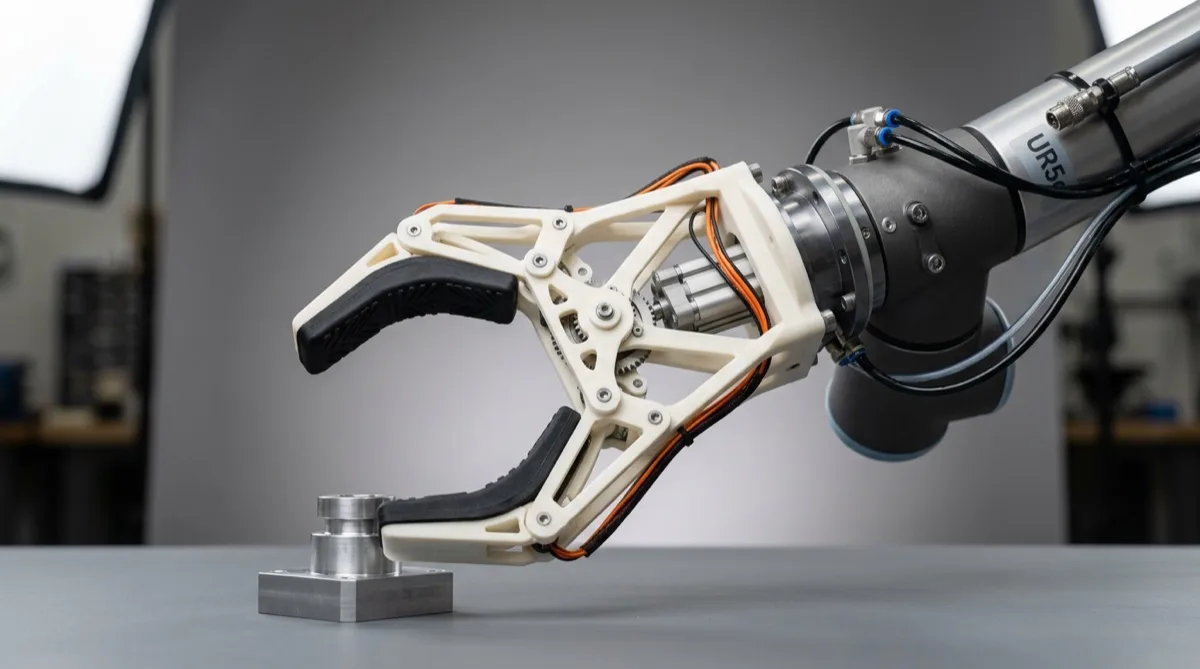
Grippers requiring a rigid structural frame and compliant finger pads benefit from PolyJet's co-printing of Digital ABS Plus (frame) and Agilus30 Shore A 50–70 (finger pads) — enabling gripper prototypes in 1–2 days versus weeks for machined + molded assemblies.
7 Common PolyJet Mistakes (and How to Avoid Them)
Walls thinner than 0.8 mm on Agilus30 zones
Problem: Thin flexible walls distort during water-jet support removal and can tear on flexible-to-rigid interfaces.
Fix: Use 1.0 mm minimum for Agilus30 walls, 1.5 mm for load-bearing flexible sections.
Expecting functional mechanical properties
Problem: Vero materials have HDT 113–122°F (45–50°C) and UTS 50–65 MPa, adequate for handling but not for load-bearing structural testing.
Fix: Use SLS PA12 or MJF PA12 for functional mechanical testing. Use PolyJet for form and fit validation only.
Blind holes deeper than 30 mm diameter:length ratio
Problem: Support gel fills deep blind holes and cannot be fully removed by water jet, leaving waxy residue.
Fix: Add vent holes (min 2.0 mm dia.) to blind cavities deeper than 30 mm, or orient to expose the hole opening.
Using VeroClear for thick optical elements
Problem: VeroClear walls >10 mm develop internal scattering and a yellow tint from UV exposure, degrading optical clarity.
Fix: Keep VeroClear wall thickness ≤8 mm for optical applications. Use in large-area thin windows, not solid lenses.
Printing thin vertical pins (< 0.8 mm) in Z
Problem: Vertical pins shorter than 0.8 mm diameter are unsupported in Z and bow under print head airflow.
Fix: Orient pins horizontally (XY plane) or increase diameter to ≥1.0 mm for Z-axis printing.
Sharp zero-thickness material boundaries
Problem: CAD files with zero-tolerance material interfaces cause delamination at the boundary — the bond area is essentially zero.
Fix: Add 0.3–0.5 mm material overlap at all rigid-flexible interfaces in your multi-body CAD.
Storing PolyJet parts in sunlight
Problem: Photopolymers continue to cross-link under UV — prolonged sunlight turns VeroClear yellow and makes Vero brittle within weeks.
Fix: Store PolyJet parts in UV-opaque bags or drawers. Apply UV-resistant clear coat if parts need outdoor use.
Frequently Asked Questions
PolyJet is a photopolymer jetting process that deposits liquid photopolymer droplets through inkjet-style print heads and instantly cures each layer with UV light. The distinguishing feature is the 16–32 µm (0.016–0.032 mm / 0.0006–0.0013 in.) layer thickness, among the finest used in polymer additive manufacturing.
PolyJet also jets multiple material types (rigid, flexible, transparent) simultaneously in a single build. Stratasys commercialized the technology under the PolyJet brand name; similar processes include 3D Systems MultiJet Printing (MJP).
PolyJet typical dimensional tolerance is ±0.1 mm (±0.004 in.) for parts under 100 mm in any axis, and ±0.2% of the nominal dimension for larger features. Layer thickness ranges from 16 µm in high-quality mode to 32 µm in high-speed mode.
Surface finish on the top (Z) face reaches Ra 1–3 µm (40–120 µin.) as-printed — comparable to SLA and significantly smoother than SLS (Ra 6–15 µm) or FDM (Ra 10–25 µm). Downward-facing surfaces that contact support material may be slightly rougher (Ra 3–6 µm) until post-processed.
Yes — this is PolyJet's defining advantage over every other polymer AM process. A J826 or J850 printer uses up to 7 material cartridges simultaneously, enabling rigid-opaque, flexible, and transparent zones in a single build without assembly or adhesive. You can also specify Shore A values between 27 and 95 by blending Agilus30 with VeroWhite in different ratios (called Digital Materials), simulating everything from silicone to rigid polypropylene.
Both processes achieve Ra 1–3 µm (40–120 µin.) on top-facing surfaces. The practical difference is support marks: SLA uses breakaway or dissolvable resin supports that can leave witness lines; PolyJet uses a water-soluble gel support (SUP706) removed by water jet, which typically leaves a cleaner result on complex undercut geometry.
For parts requiring matte or textured appearance on all faces, both processes require post-sanding. PolyJet's advantage is multi-material; SLA's advantage is lower cost per part and wider build volumes on industrial machines.
The practical minimum wall thickness for rigid PolyJet materials (Vero family) is 1.0 mm (0.040 in.) for structural walls and 0.6 mm (0.024 in.) for thin-section cosmetic features. Flexible Agilus30 walls should be 0.8–1.5 mm minimum to ensure dimensional accuracy and support removal access. Walls thinner than 0.5 mm in any material are unsupported by the process spec and may delaminate or distort. For hollow shells, maintain a minimum 1.5 mm wall thickness to survive support removal water pressure.
PolyJet is the most material-intensive polymer AM process — photopolymer resin costs $91–182/lb ($200–400/kg) compared to $14–27/lb ($30–60/kg) for SLS nylon powder. Expect $50–150 for a palm-sized single-material prototype, and $150–500+ for multi-material assemblies.
The higher cost is justified when multi-material capability eliminates assembly steps that would otherwise require molded overmolding or manual gasket insertion. For cost-sensitive single-material prototypes, SLA or MJF delivers equivalent visual quality at 40–70% lower cost.
Stratasys PolyJet offers six primary material families: (1) Vero rigid opaque (VeroWhite, VeroBlack, VeroBlue — Shore D 83, UTS 50–65 MPa); (2) VeroClear transparent (Shore D 80, UTS 50–55 MPa); (3) Agilus30 flexible elastomer (Shore A 30–95 depending on Digital Material blend, elongation 220%); (4) RGD525 high-temperature rigid (HDT 63–67°C / 145–153°F); (5) MED610/MED620 biocompatible grades (ISO 10993-5 / USP Class VI cytotoxicity-tested); (6) Digital ABS Plus (simulates ABS, HDT 58–68°C / 136–154°F, improved impact resistance).
PolyJet Vero materials have moderate mechanical properties: UTS 50–65 MPa (7,250–9,425 psi / 500–650 bar), elongation at break 10–25%, flexural modulus 2.0–3.0 GPa. These values are adequate for handling and fit-check prototypes but below injection-molded engineering plastics.
The HDT of standard Vero is 113–122°F (45–50°C), which limits use above room temperature. For higher-temperature functional testing, RGD525 extends HDT to 145–153°F (63–67°C). For true functional mechanical testing at production-intent loads, SLS PA12 (UTS 48–50 MPa, elongation 18–20%, isotropic) or MJF PA12 (UTS 48 MPa, near-isotropic) are better choices.
Need Multi-Material Parts or High-Finish Prototypes?
Upload your CAD file to review PolyJet material fit, wall thickness, and build orientation during quoting. Final manufacturability confirmation happens before production.
Review PolyJet Quote